IIHE Wifi: Difference between revisions
From IIHE Wiki
Jump to navigationJump to search
No edit summary |
No edit summary |
||
| Line 6: | Line 6: | ||
==Configuration under MacOS and Linux== | ==Configuration under MacOS and Linux== | ||
For all platforms (except Windows), just select the SSID iihe-wlan in the network list and use your IIHE credentials to connect. | |||
Revision as of 12:32, 19 January 2015
First step
If your IIHE account is older than December 2014, please connect to https://my.iihe.ac.be/profile and update your password. Otherwise, you can't connect to the Wi-Fi network.</h>
Second step
Configuration under MacOS and Linux
For all platforms (except Windows), just select the SSID iihe-wlan in the network list and use your IIHE credentials to connect.
Configuration under Windows
   For auto configuration download and extract the file : iihe-wlan_install.zip

double-click on install.bat, enter your login and password


   For manual configuration follow the next steps
| step 1: | step 2: | step 3: |
 |
 |

|
| step 4: | step 5: | step 6: |
 |
 |

|
| step 7: | step 8: | step 9: |
 |
 |

|
| step 10: | step 11: | step 12: |
 |
 |

|
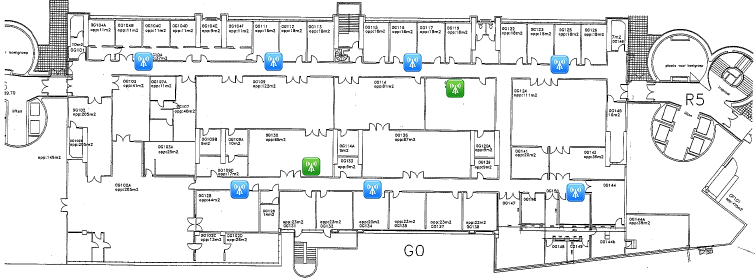
Access Point location map
Ground floor
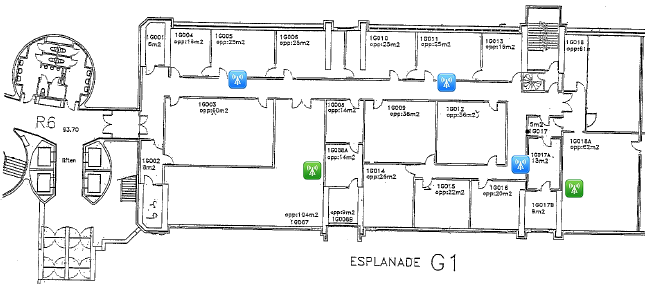

First floor